How to Stay Consistent on X With a Full-Time Job
How to Stay Consistent on X With a Full-Time Job
79% of creators have experienced burnout. That number jumps to 83% for those trying to monetize their presence.
If you're building an X presence while working a full-time job, the pressure is real. You're not just fighting for attention on a platform with 500+ million daily tweets,you're doing it in the margins of an already full life.
Here's how to stay consistent without destroying yourself.
The Reality of Time
Let's start with honesty about what you're working with.
The average X user spends 28-34 minutes daily on the platform. Power users,the top 10%,spend about 58 minutes. Most people check multiple times throughout the day.
Your goal isn't to match power user time. It's to make the time you do have count.
The uncomfortable truth: 30 minutes of focused, strategic activity beats 2 hours of aimless scrolling and random posting. Every time. The 15-minute daily loop proves this is achievable.
The Minimum Viable Routine
Here's a sample schedule for someone working 9-5:
Morning (before work) - 15 minutes:
- Check notifications and respond to mentions
- Engage with 3-5 posts from your network
- Review scheduled posts for the day
Lunch break - 10 minutes:
- Post midday content (if scheduled)
- Quick engagement with trending topics in your niche
Evening (after work) - 20 minutes:
- Post evening content
- Engage with community
- Schedule next day's content
Weekend batching session - 2 hours:
- Create content for the week
- Schedule all posts
- Plan engagement topics
- Review analytics
Total weekly investment: About 5.5 hours.
That's manageable. It's not glamorous, but it works.
Batching: Your Secret Weapon
Content batching is creating multiple posts in one session,like meal prepping for social media.
Why it works:
Batching saves hours every week by eliminating context-switching. Instead of the daily "what should I post?" panic, you've already decided. It ensures consistency because content goes out even when life gets busy.
How to implement batching:
Establish content pillars. Pick 4-5 recurring themes that align with your expertise. Without pillars, posting becomes random and unfocused.
Brainstorm in bulk. Generate 10-20 content ideas at once using audience questions, industry trends, or past high-performing posts.
Create in focused sessions. Set a timer, close tabs, put your phone away. 90 focused minutes can produce a week's worth of content.
Schedule ahead. Use a scheduling tool to queue posts at optimal times.
Recommended batching frequency: Every week, batch content for the upcoming week. Some people batch monthly, but weekly keeps content fresher and allows adjustment based on what's working.
The Best Times for 9-5 Workers
When you're working full-time, timing matters even more. You need posts going out when your audience is active, even if you're in meetings.
Optimal posting windows (see best times to post for more detail):
- Morning: 7-9 AM (catching commuters and early-risers)
- Midday: 12-2 PM (lunch break scrollers)
- Evening: 7-9 PM (relaxation time)
Best days: Tuesday through Thursday typically see highest engagement. Wednesday at 9 AM often shows peak activity.
The key insight: Consistency matters more than finding a single "magic time." Your audience learns when to expect content from you. A predictable rhythm builds reliability with both humans and the algorithm.
Sustainable Posting Frequency
You don't need to post five times daily to grow.
What the data shows:
- Minimum viable: 3-5 posts per week, maintained consistently
- Solid growth: 1-2 quality posts per day
- Optimal: 2-3 posts per day (if you can maintain quality)
The median tweets per week for brands dropped from 5 in 2021 to 2 in 2024. Less frequent, higher quality posting is working for more accounts.
For working professionals: Choose a posting cadence you can sustain indefinitely. Better to post consistently three times weekly than burn out after two weeks of daily posting.
Essential Tools for Efficiency
The right tools multiply your limited time.
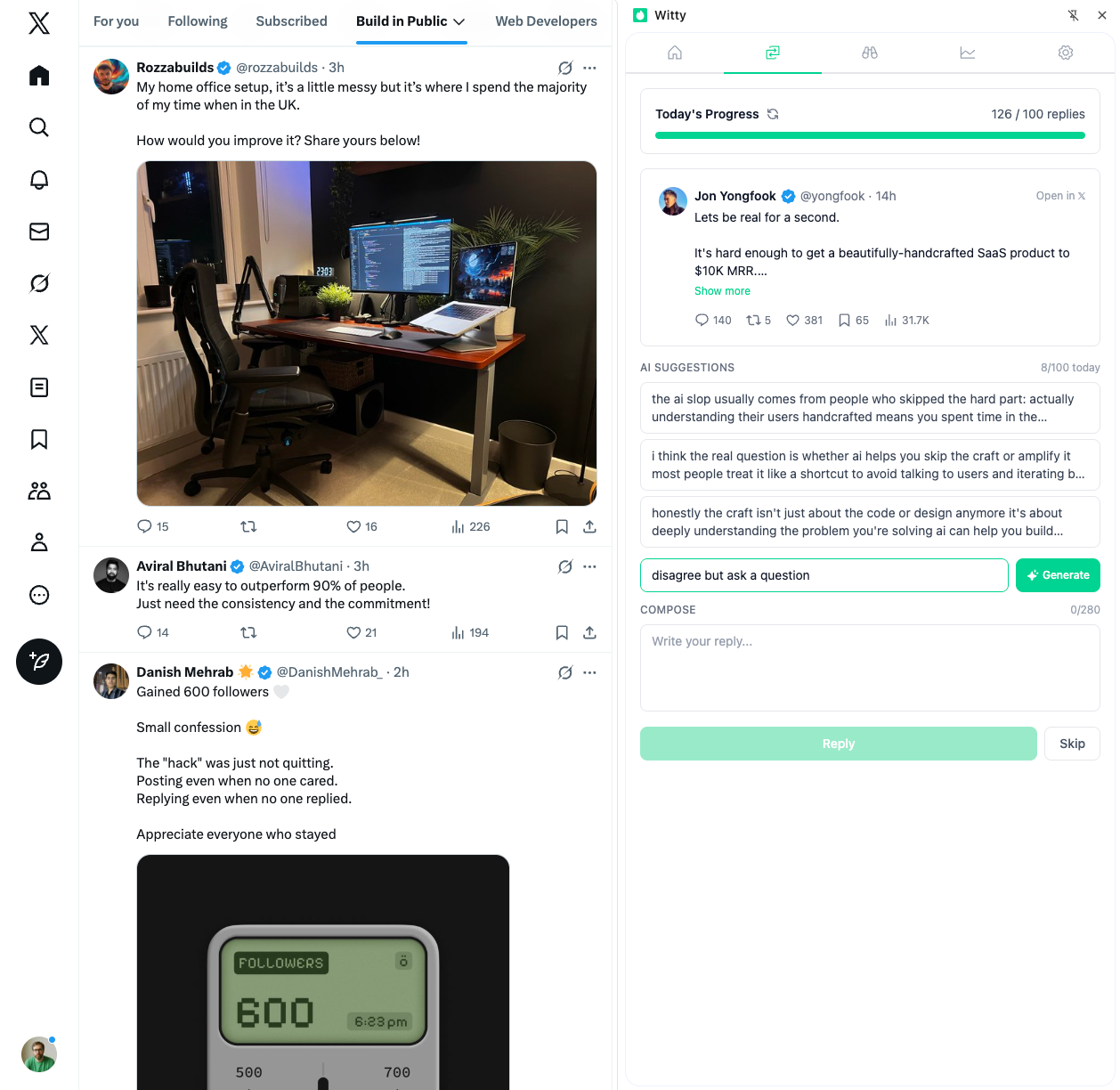
For engagement efficiency: A tool like Witty (a Chrome extension) can help you maintain consistent engagement even with limited time. Its reply queue lets you batch your replies and spread them throughout the day, so you can engage during your morning commute and have interactions flowing while you're in meetings. For a structured approach to engagement, check out the daily engagement system.
Key features to prioritize:
- Bulk scheduling capabilities
- Analytics and performance tracking
- Content recycling for evergreen posts
- Mobile apps for on-the-go adjustments
83% of marketers report producing significantly more content with AI assistance. These tools aren't cheating,they're working smart.
Protecting Against Burnout
Burnout isn't just feeling tired. It's chronic emotional and physical exhaustion from non-stop pressure.
What causes it:
- Pressure to stay relevant and keep up with algorithms
- Never-ending demand for new content
- Blurred boundaries between work and personal time
- Managing everything: creation, engagement, analytics, strategy
Prevention strategies:
Set boundaries. Define specific hours for X activity and stick to them. When you're off, you're off. Learn more about avoiding the posting treadmill.
Batch content. Removes the daily production pressure that leads to anxiety.
Build buffer time. Don't fill every day with publishing obligations. If you're posting 3x/week, plan for 2 and leave one optional.
Set realistic expectations. You don't have to post every day or engage with every comment. Be honest about what's achievable.
Focus on fewer platforms. Trying to maintain presence everywhere is a recipe for burnout. X might be enough.
Prioritize actual rest. Mental and emotional health matters more than producing content. Exercise, reading, time with friends,these aren't luxuries.
Case Studies: People Who Made It Work
Amanda Natividad (now VP of Marketing at SparkToro): Used X as a professional tool while working as a journalist. Treated tweets as if a future employer might be watching. Shared both work and life content in a professional tone. One year after committing to consistent X use, Rand Fishkin offered her a VP role,she wasn't even looking.
Momina (Corporate to Freelance): Built her X presence while working a corporate 9-5 in content marketing. When she tweeted about going freelance, connections responded immediately. She got three jobs the next day from X relationships.
Darren Tabor (CEO): Grew following by 1,000% in 3 months using scheduling tools to manage around a hectic CEO schedule. Proves you can build presence without constant active management.
The pattern: Consistency over intensity. Professional but personal tone. Building network before needing it. Using tools to manage time constraints.
Your Action Plan
First week:
- Audit your available time realistically
- Set up a tool to help manage your workflow (Witty's Chrome extension works well for engagement)
- Create 5-7 posts to schedule for the following week
- Identify 10-20 accounts to engage with regularly
Ongoing habits:
- Morning: 10-minute engagement session before work
- Evening: 15-minute engagement and scheduling session
- Weekend: 1-2 hour content batching session
Monthly check-in:
- Review what content performed best
- Adjust posting times based on your analytics
- Evaluate if your current frequency is sustainable
- Add or remove accounts from your engagement list
The people who succeed on X with full-time jobs aren't the ones with secret tricks. They're the ones who commit to a sustainable process and stay consistent.
Your presence compounds. Each week builds on the last. But only if you're still showing up.
Related Articles

Your First Post on X: What to Write
The blank post box is intimidating when you're starting out. The pressure to be brilliant creates paralysis. Your first post doesn't need to be brilliant. It needs to exist. Here's how to break through the blank page and start building your posting habit.
5 min read
Setting Realistic X Goals (That Won't Burn You Out)
10,000 followers in 30 days. 100 replies daily. Post every 4 hours. Most growth goals are designed to create burnout, not success. Sustainable goals match your life circumstances and compound over time. Here's how to set targets that actually work.
6 min read
Niche vs Broad: Choosing Your X Strategy
Post about everything that interests you, or focus narrowly on one topic? Both approaches can work. Neither is universally correct. The choice depends on your goals, your situation, and what you can sustain. Here's how to decide which path fits your circumstances.
5 min readYou've done the learning. Now put it into action.
Witty finds tweets worth replying to and helps you craft responses in seconds. Grow your audience without the grind.
No credit card required.