How AI Reply Suggestions Can Speed Up Your Growth
How AI Reply Suggestions Can Speed Up Your Growth
AI tools have transformed content creation. But can they help with something as personal as replies? Used correctly, yes, with important caveats.
AI can help you engage more consistently, break through creative blocks, and save significant time. It cannot replace your authentic voice, your real expertise, or your genuine relationships. The goal is still to write replies that match the anatomy of a high-value reply.
Here's how to use AI assistance for replies without losing what makes your engagement valuable.
AI Reply Tools Built for X
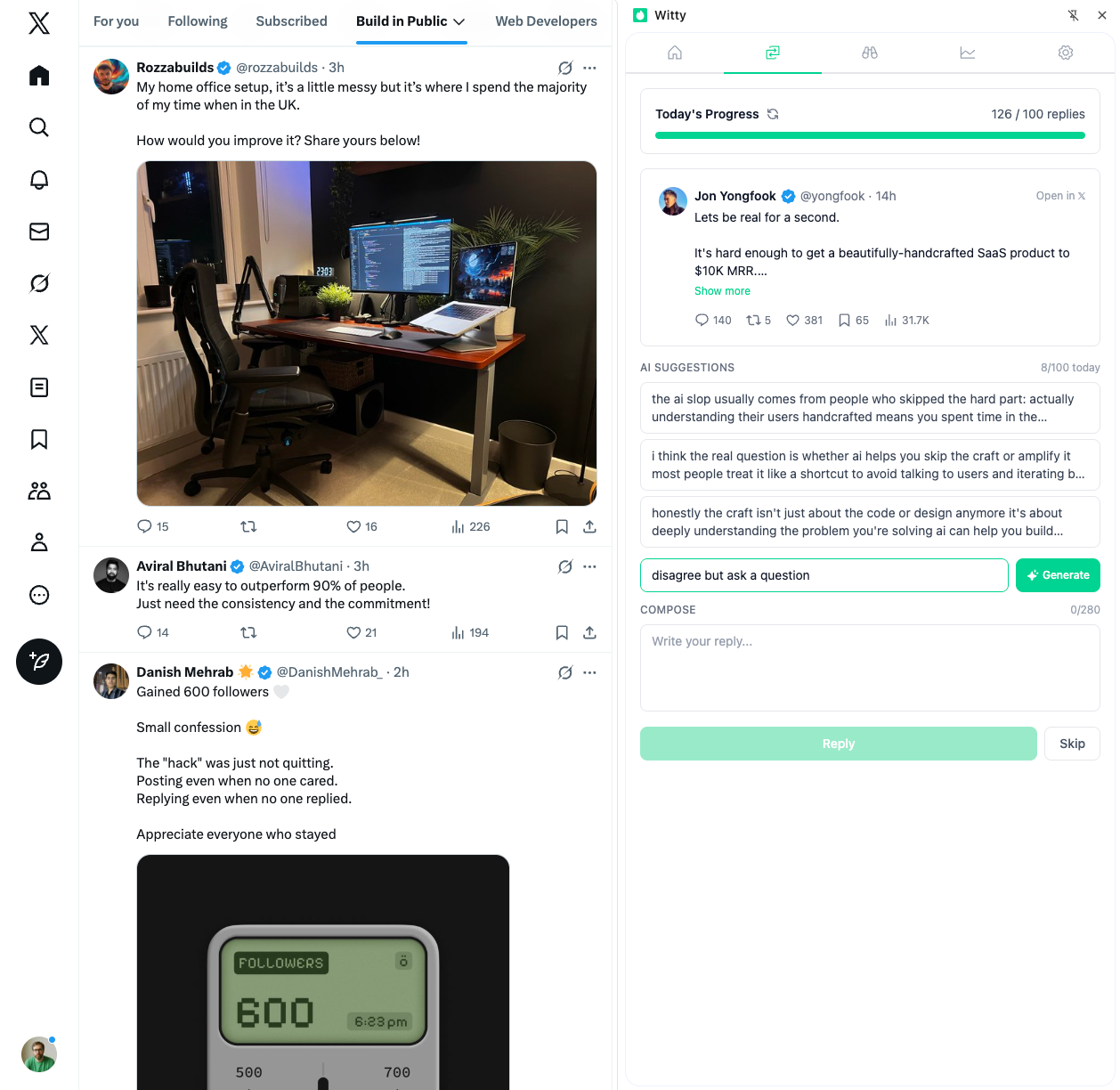
The Witty Chrome extension is purpose-built for AI-assisted engagement on X. It offers AI reply suggestions that help you compose replies faster, AI personalization with custom instructions to match your voice, and AI post analysis to help you understand any post before responding.
Unlike generic AI tools, Witty integrates directly into X and learns your communication style. The custom instructions feature lets you define your tone, areas of expertise, and preferences so suggestions align with how you actually write.
Witty also includes a reply queue that helps you manage high-volume engagement without hitting rate limits, and account analytics to track how your reply strategy is performing.
The AI-Assisted Reply Model
AI reply assistance works as a starting point, not a finished product. You provide the post you want to reply to as input. The AI generates draft options based on context. You personalize and refine to your voice. The final reply contains your thinking at AI-assisted speed.
The key phrase is "AI-assisted," not "AI-generated."
Where AI Actually Helps
Speed Advantage
Without AI assistance, finding a reply-worthy post takes about 2 minutes, thinking of an angle takes 3 to 5 minutes, drafting the reply takes another 3 to 5 minutes, and editing takes 2 minutes. Total: 10 to 14 minutes per quality reply.
With AI assistance, finding a reply-worthy post still takes 2 minutes, generating options takes about 30 seconds, and selecting and editing takes 2 to 3 minutes. Total: 4 to 6 minutes per quality reply.
The potential savings run 50 to 60 percent in time reduction.
Volume Impact
If you currently spend 2 hours on 10 replies, AI assistance might let you complete those same 10 replies in 50 minutes, or complete 20 replies in 1.5 hours.
Same time, more output. Or same output, more time for other work. This efficiency supports building a strong reply portfolio.
High-Value Use Cases
AI assistance works well for common topics, questions you answer repeatedly, predictable conversations, and standard advice you share regularly.
It helps with quick engagement during time-sensitive opportunities when early timing matters, high-volume reply sessions, and maintaining consistency during busy periods.
AI provides drafting foundations, starting points for complex replies, structure for longer responses, and ideas when you are stuck.
And it breaks blocks. When you know you should engage but cannot find the words, AI can unstick you.
Where AI Falls Short
AI can generate plausible-sounding content, but it cannot replicate your specific experience or deep domain knowledge. Nuanced expertise requires your actual background.
Personal stories must come from you. Only you can share what happened to you. AI might suggest structure, but the content has to be yours.
AI lacks relationship context. It does not know your history with someone, inside references, or ongoing conversations.
Sensitive topics require your judgment, not AI's generic positioning. Nuanced takes on controversial subjects need human discernment.
The Authenticity Imperative
The crucial rule: never post AI output directly.
The process must include generating suggestions, reviewing for relevance, editing for your voice, adding personal elements, and a final check before posting.
The Voice Check
Before posting, ask whether this sounds like you, whether your followers would recognize it as yours, and whether you added something only you could add.
If you cannot answer yes to all three, edit more.
The Personal Touch Requirements
Always add your specific experience, your unique perspective, your natural language patterns, and something only you know.
The 80/20 Rule
80 percent should be your thinking, your edit, your voice. 20 percent is AI assistance, speed, and structure.
If this ratio inverts, you are using AI wrong.
Practical AI Reply Workflow
The Three-Step Process
First, identify the opportunity. Find a post worth replying to, note the key points you want to address, and consider your angle.
Second, generate a draft. Use AI to create 2 to 3 options, scan for the best starting point, and note any good elements to keep.
Third, personalize. Add your experience or insight, adjust to your voice, remove generic phrasing, and run a final quality check.
The Speed Session
A 15-minute AI-assisted reply session works like this. Spend minutes 1 through 5 identifying 5 reply targets. Spend minutes 6 through 10 generating and selecting drafts. Spend minutes 11 through 15 personalizing and posting.
The output: 5 quality replies in 15 minutes. Make this part of your daily engagement system.
Avoiding AI Pitfalls
The Detection Risk
AI-generated content can sound generic, lack personality, miss context, and feel "off" to readers. Experienced 𝕏 users can often sense AI-generated replies because the lack of personality is obvious.
Mitigate this through heavy editing, personal additions, and voice consistency.
The Authenticity Trap
The risk is becoming too reliant on AI and losing your authentic voice over time. Prevent this by writing some replies fully manually, regularly checking if your voice remains consistent, and getting feedback from trusted connections.
The Volume Trap
The risk is using AI to post more but say less. Quantity without quality. Prevent this by maintaining the same quality standards regardless of AI assistance. Five great AI-assisted replies beat 15 mediocre ones. Focus on value, not just volume.
Ethical Considerations
Be mindful about ethics. Do not misrepresent AI-generated content as fully original. Maintain authentic relationships. Do not automate genuine connection.
The goal is efficiency, not deception.
Measuring AI-Assisted Performance
Track the Right Metrics
Compare before and after AI implementation. Track efficiency through time per reply and replies per session. Track quality through engagement per reply including likes and responses. Track effectiveness through profile visits from reply activity. Track authenticity by assessing whether your voice still comes through.
Weekly Quality Check
Read back your AI-assisted replies and ask whether they sound like you, whether they are building relationships, whether you have received any negative feedback, and whether you would be proud of each one.
If the answers are concerning, reduce AI reliance or increase editing.
Getting Started
Start by experimenting during your first week. Try different AI tools, test with various posts, and note what works and what feels off.
During your second week, establish your workflow. Create your process, define editing standards, and build consistency.
The third week is for measurement. Track metrics, compare to your baseline, and identify what needs adjustment.
The fourth week is for refinement. Adjust your workflow based on data, improve your prompts and inputs, and optimize for quality.
The Long-Term View
AI assistance should save you time, maintain quality, preserve authenticity, and enable consistency. If it is not doing all four, adjust or reduce usage.
The goal is not to automate relationship building. Relationships cannot be automated. The goal is to remove friction so you can build more relationships in less time while keeping the human elements that make those relationships meaningful.
Use AI as a tool, not a replacement. Your voice, your expertise, your genuine interest in people, those remain the core of what makes your engagement valuable. This is why replies work for growth: they build genuine connections. AI just helps you show up more consistently.
Related Articles

The Minimalist Content Workflow for X
The average adult makes 35,000 decisions a day. Every time you sit down to post, you add more. Most workflows try to solve this by adding more tools and processes. The real solution is subtraction. A minimalist workflow eliminates unnecessary decisions while maintaining quality output.
7 min read
How Reply Queues Help You Avoid X Rate Limits
One user got locked out by lunchtime despite being well under the 2,400 daily tweet limit. The problem wasn't volume. It was velocity. X monitors action patterns, not just totals. A reply queue distributes your engagement throughout the day, keeping you visible without triggering alarms.
8 min read
The New User's Guide to X Lists, Circles, and Feeds
𝕏 has more organization features than most users ever discover. Lists, feeds, muted words, topics. Understanding them transforms your experience from overwhelming noise to curated value. Here's everything you need to know.
7 min readYou've done the learning. Now put it into action.
Witty finds tweets worth replying to and helps you craft responses in seconds. Grow your audience without the grind.
No credit card required.